

Choosing an LLM evaluation platform gets confusing once you look past the feature lists.
Braintrust and Arize Phoenix both let teams evaluate AI applications, work with datasets, run experiments, and inspect what happens during LLM application runs. Braintrust and Arize Phoenix both sit within the broader AI development stack, helping teams evaluate AI applications, work with datasets, run experiments, and inspect what happens during LLM application runs. So, the usual comparison of "evaluation vs observability" doesn't tell the whole story anymore. Phoenix, for example, now combines tracing with evaluations, datasets, experiments, and prompt iteration.
The more useful question is what you need the platform to help you do.
If a prompt or model change makes your support agent perform worse, do you mainly need to understand what happened inside the failed run? Or do you need a repeatable evaluation workflow that can catch the regression before the change reaches production?
That difference is where Braintrust and Phoenix start to separate.
Braintrust puts a lot of emphasis on connecting production data, evaluations, datasets, experiments, and release workflows. Phoenix takes a strong tracing-first approach while also giving developers tools for evaluation and experimentation.
So, in this comparison, we'll look beyond feature checklists and compare how the two platforms fit into the actual development workflow, from debugging a bad run to testing a change and deciding whether it is ready to ship.
Table of Contents
Braintrust vs Arize Phoenix at a glance
Braintrust and Arize Phoenix overlap in several areas, so the difference is not as simple as saying one is for evaluation and the other is for observability. Both can help teams evaluate AI applications, work with datasets and experiments, and understand how an application behaves.
The bigger difference is where each one fits into the development process. Braintrust puts more emphasis on turning evaluation into a repeatable development and release workflow. Phoenix puts more emphasis on understanding what is happening inside the application, especially through tracing and detailed execution data.
| Braintrust | Arize Phoenix | |
|---|---|---|
| Primary strength | Evaluation and development workflow | Observability, debugging and evaluation |
| Best fit | Teams building repeatable evaluation and release workflows | Teams that need detailed visibility into AI application behavior |
| Tracing | Yes | Strong OpenTelemetry and OpenInference tracing |
| Evaluation | Strong | Strong |
| Datasets and experiments | Yes | Yes |
| CI/CD | Strong workflow support | More developer-controlled |
| Deployment | Managed SaaS and enterprise options | Open source, self-hosted and cloud options |
| Best starting point | "Is this change better?" | "What actually happened?" |
The last two questions are a useful way to understand the difference. If your team is constantly changing prompts, models or agent logic and needs to know whether each change improves the application, the evaluation workflow matters more. If the team is spending more time investigating failed runs and trying to understand what happened inside an agent, detailed tracing becomes more important.
The difference becomes clearer when an AI system fails
Imagine a customer support agent that starts giving customers incorrect refund information after a prompt change.
The first question is not which platform has more features. You need to find out what actually went wrong.
Did the model misunderstand the request? Did the agent retrieve the wrong information? Did a tool return unexpected data? Was the final answer wrong even though the individual steps looked fine?
Once you find the problem, there is another set of questions. Can you reproduce the failure? Can you turn that example into a test? Does the new prompt fix the problem without creating another one? And before the change reaches production, can you check that it has not caused a regression somewhere else?
This is where the two platforms start to feel different.
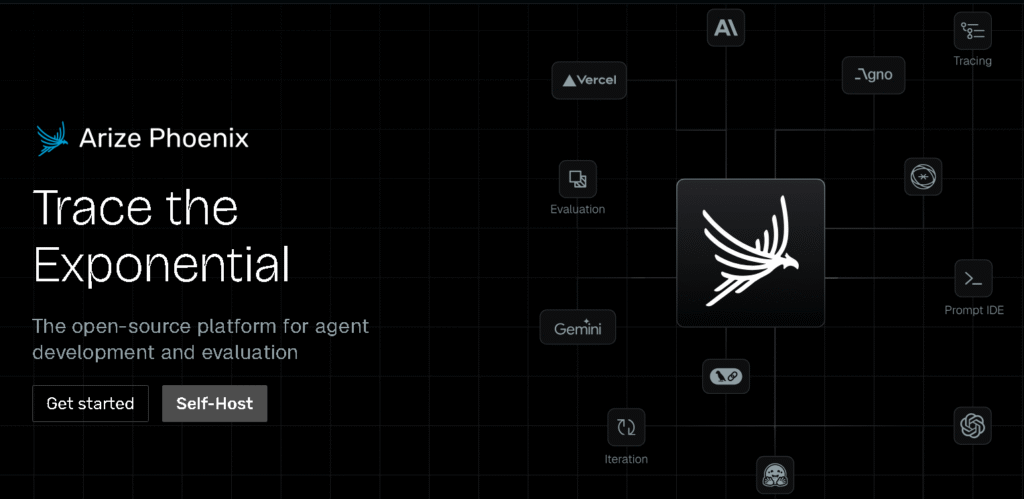
With Phoenix, detailed traces can help you follow an AI application's execution and inspect the steps that led to the final response. That can be useful when the main problem is understanding a production failure.
Braintrust puts more emphasis on taking evaluation results and making them part of an ongoing development workflow. A failed example can become part of the evaluation process, where teams can test changes and use those results to decide whether a new version is ready.
The distinction is not absolute. Both platforms now cover more ground than their original positioning suggests.
The more useful question is where your team needs the most help. If most of the work is diagnosing why an agent behaved badly, visibility into the execution matters. If the bigger problem is checking every change before it reaches users, a repeatable evaluation and regression workflow matters more.
That is the distinction we will use throughout this comparison.
Tracing and production debugging
When an AI agent gives the wrong answer, the final response usually doesn't tell you where things went wrong. The problem could be the model, a retrieval step, a tool call, the context passed to the model, or something earlier in the workflow. That becomes even harder to diagnose as agents take on more tools and multi-step business workflows.
Both Braintrust and Phoenix can break an AI run into traces and spans so engineers can inspect those steps. Braintrust captures LLM calls, tool calls, retrieval steps and other spans, while Phoenix is built around OpenTelemetry and OpenInference based tracing.
The difference becomes more noticeable when you are debugging a production run. You may want to see the exact input and output of a tool, which documents were retrieved, how long each step took, or which part of an agent workflow produced the unexpected result. That level of detail can make a big difference when the final answer looks fine on the surface but something went wrong earlier.
Phoenix is particularly suited to teams that want tracing to be a central part of how they investigate AI applications. Braintrust also has detailed tracing but connects those traces more directly with scoring and evaluation workflows. A failing trace can be scored, reviewed, and moved into an evaluation dataset.
So the useful question is not which platform has tracing. Both do. It is whether your team mainly needs tracing to investigate failures or wants to use those traces as part of the next evaluation cycle.
Evaluation, datasets, and experiments
This is one area where the old Braintrust versus Phoenix comparison can be misleading. Both platforms now have a proper evaluation workflow.
You can create datasets, run experiments, apply evaluators, compare results, and use real application data rather than relying only on manually written test cases. Phoenix lets teams work with datasets and attach evaluators to experiments, including code based and LLM based evaluation.
Braintrust takes a similar approach. Its datasets can contain examples from production logs, user feedback, or manually created cases, and those datasets can then be used to test prompts, models, or application changes. It also lets teams move selected production traces into evaluation datasets.
There is an important difference in how the workflow feels, though. Braintrust puts a lot of emphasis on keeping production traces, datasets, experiments, scores, and releases connected. Phoenix gives engineers more direct control over how datasets, tasks, evaluators, and experiments are put together.
That matters if your team wants a ready-made evaluation workflow versus a system that can be shaped around its existing engineering process.
Neither choice is automatically better. A team with a simple evaluation process may prefer the more integrated workflow. A team with custom evaluation logic may care more about how much control it has over the underlying process.
CI/CD and regression prevention
An evaluation is much more useful when it can run before a change reaches production.
Suppose an engineer changes a system prompt or moves to a different model. The question is no longer just whether the new response looks better in a few examples. The team needs to know whether the change improves the overall test set without quietly breaking something else.
Braintrust has a particularly direct workflow for this. Its current documentation supports running evaluations in pull requests, comparing experiment results, setting score thresholds, and blocking a merge when quality falls below the defined threshold.
Phoenix can also be used as part of an evaluation and CI/CD workflow through its datasets, experiments, and code-based evaluators. The difference is that the workflow is more developer controlled rather than being presented as a single release-gating system.
For a team that wants evaluation to sit directly inside the software release process, Braintrust has a clear advantage here. The important part is not the CI/CD label itself. It is being able to turn a quality check into something that can actually stop a bad change from being shipped.
Open source, self-hosting, and data control
Deployment can change the decision completely for teams that cannot simply send application traces to a managed service.
Phoenix is open source and can be run in your own environment. That gives engineering teams more control over where the application data is stored and how the infrastructure is operated.
Braintrust is primarily a managed platform, although its Enterprise offering includes hosted and on-prem deployment options for high-volume or privacy-sensitive use cases.
That does not make Phoenix automatically more secure or Braintrust automatically less secure. Self-hosting moves more responsibility to your team. Someone has to manage the infrastructure, upgrades, storage, access controls, backups, and monitoring.
For a company with strict data requirements and an existing platform engineering team, that control may be worth it. For a smaller team that would rather not operate another system, a managed service can be the more practical choice.
Pricing and total cost
Price is another area where a simple comparison can give the wrong impression.
| Braintrust | Arize Phoenix | |
|---|---|---|
| Free option | Starter, $0/month | Free and open source |
| Starting paid plan | Pro, $249/month | No paid license required for self-hosting |
| Usage limits | 1 GB processed data and 10K scores included on Starter | Self-hosted usage is user-managed |
| Data retention | 14 days on Starter, 30 days on Pro | User-managed when self-hosted |
| Self-hosting | Enterprise | Yes |
| Hosted option | Managed cloud | Phoenix Cloud |
| Enterprise pricing | Custom | Support and enterprise options vary by Arize offering |
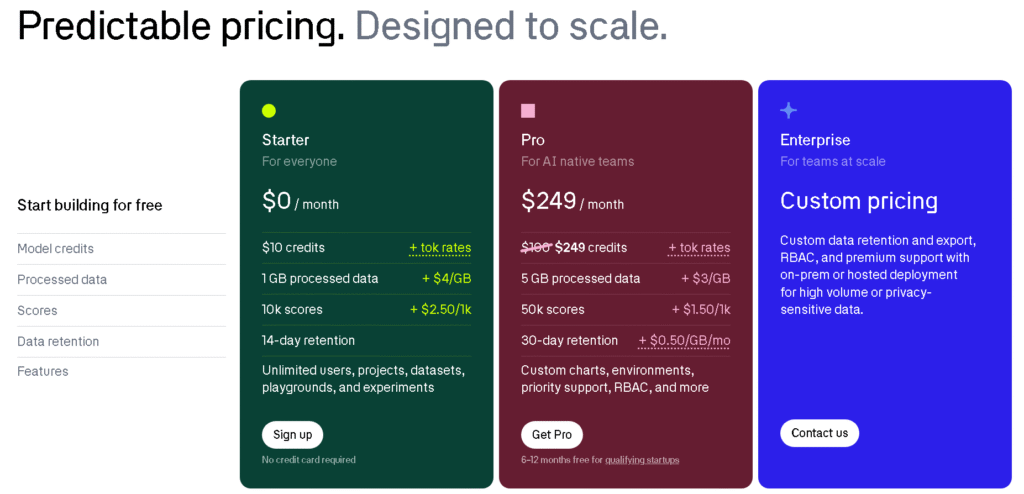
Braintrust currently has a free Starter plan, a $249 per month Pro plan, and custom Enterprise pricing. The Starter and Pro plans also have usage-based charges for processed data and scores, while Enterprise adds custom retention and deployment options.
Phoenix is open source, so the software itself can be run without a platform subscription. Arize also offers its managed AX product separately, with its own pricing structure.
But the real comparison is not just the number on the pricing page.
For a self-hosted deployment, you also have infrastructure, storage, maintenance, upgrades, monitoring, and engineering time. A managed platform costs more directly, but it can remove much of that operational work.
So the better question is:
What will this platform cost us to run, maintain, and scale over the next year?
That gives a much more realistic picture than comparing subscription prices alone.
Which one should you choose?
There isn't a single winner here. The better choice depends on where your team is feeling the most friction.
Choose Braintrust if evaluation is already part of your development process and you want to make it easier to test changes before they reach production. It makes more sense when your team cares about regression testing, repeatable experiments, CI/CD checks, and connecting production feedback back to the evaluation workflow.
It can also be a better fit when developers, product teams, and other reviewers need to work from the same evaluation results instead of maintaining separate testing processes.
Choose Arize Phoenix if the harder problem is understanding what your AI application is actually doing. That matters more when you're debugging production failures, working with complex RAG pipelines or agents, or need detailed traces to follow a request through multiple steps. Phoenix is also worth considering when open source deployment and control over your infrastructure are important requirements.
The choice can change as the application matures. A small team may initially care more about getting an evaluation workflow running quickly. Once the system has more agents, tools, retrieval steps, and production traffic, detailed tracing may become much more important.
So don't choose based on the feature count. Start with the problem your engineering team is trying to solve most often.
What if you need both?
The choice doesn't always have to be Braintrust or Phoenix.
A team may use Phoenix when it needs to inspect a difficult production run, follow the trace, and understand where an agent went wrong. Braintrust can then fit into the evaluation and release side of the workflow, where that failure becomes a test case and future changes can be checked against it.
But adding both platforms isn't automatically a better setup. They overlap in tracing, evaluation, datasets, and experiments, so running both can also create duplicated instrumentation, data pipelines, storage, and maintenance.
Using both makes more sense when each platform has a clearly defined job in the stack. If one tool already covers the team's requirements, adding another can create more operational work without adding much value.
Final verdict
Braintrust is the stronger fit when evaluation needs to be part of the development and release process. Arize Phoenix is a stronger fit when detailed production visibility, debugging, open source deployment, or infrastructure control matters more.
The decision isn't really about which platform has more features. Both now cover tracing, evaluation, datasets, and experimentation.
The better choice is the one that fits the problem your team has today: preventing regressions, understanding production behavior, or both.
FAQs
Is Braintrust better than Arize Phoenix?
Neither is better for every team. Braintrust is a stronger fit for teams that want evaluation closely tied to development and CI/CD, while Phoenix is a strong choice for teams that prioritize detailed tracing, production debugging, and open source deployment.
Is Arize Phoenix open source?
Yes. Phoenix is an open source project that can be run in your own environment. That gives teams more control over deployment and data, although self-hosting also means taking responsibility for infrastructure, upgrades, storage, and maintenance.
Which is better for LLM evaluation, Braintrust or Phoenix?
Both support LLM evaluation, datasets, experiments, and different types of evaluators. Braintrust has a stronger emphasis on connecting evaluation with development and release workflows, while Phoenix combines evaluation closely with its tracing and observability workflow.
Can Braintrust and Phoenix be used together?
They can be, but using both isn't necessary for every team. The combination makes more sense when you have a clear reason to use Phoenix for detailed application visibility and Braintrust for evaluation and release workflows. If their capabilities overlap too much for your use case, one platform may be simpler to operate.


