

What Is Zapier MCP?
Zapier MCP – short for Model Context Protocol – is a middleware layer that connects AI assistants to Zapier's ecosystem of 5,000+ app integrations. Instead of writing custom code for every tool, you configure a single endpoint and your AI can instantly read, write, and trigger actions across hundreds of platforms.
The protocol follows the OpenAPI specification, enabling AI models to discover available actions through schema definitions, validate input parameters before execution, and receive structured responses in real time. Understanding what is Zapier MCP is essential before diving into setup: it is not a simple webhook – it is a bidirectional, authenticated communication channel between your AI and the apps it needs.
Key insight: The Zapier MCP protocol treats AI assistants as first-class API clients, giving them the same programmatic access a developer would have – with enterprise-grade security layered on top.
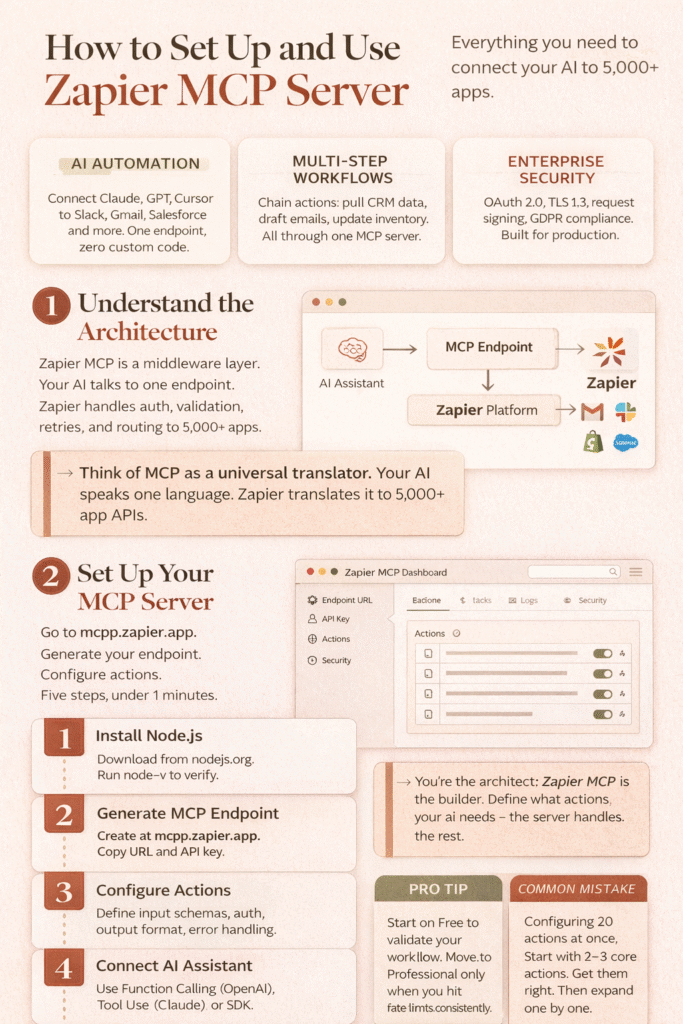
How the Protocol Works – Technical Architecture
At a high level, requests flow like this:
AI Assistant → MCP Endpoint → Zapier Platform → External Apps → (response back)
The middleware handles authentication, input validation, retry logic, and structured response formatting so your AI receives clean, predictable data regardless of which app sits at the other end.
This bidirectional flow happens in real time, making the server suitable for both user-triggered requests and background event-driven workflows.
Why Use the Server?
The Zapier MCP server dramatically lowers the barrier for AI automation. Key advantages include:
- No custom integration code – the Zapier MCP protocol handles schema discovery and parameter validation automatically.
- Access to 5,000+ apps including Google Workspace, Salesforce, Slack, HubSpot, Asana, Jira, Shopify, and more.
- Compatible with leading AI platforms: OpenAI GPT-4/3.5, Anthropic Claude, Cursor, and any custom MCP client.
- Enterprise-grade security with OAuth 2.0, TLS 1.3 encryption, request signing, and granular permissions.
- Versioned API support ensures backward compatibility for long-term deployments.
Whether you are building a customer-facing AI assistant or an internal productivity tool, the server provides the infrastructure to connect intelligent models with real business applications – without a large engineering team.
How to Set Up the Server – Step-by-Step Guide
Follow these five steps to get the server running and connected to your AI.
Step 1 – Install Node.js (Prerequisites)
The Zapier MCP server requires Node.js. Install it for your platform:
- Windows: Download the installer from nodejs.org and run it.
- macOS: Run
brew install nodein Terminal (requires Homebrew). - Linux: Use your package manager, e.g.
sudo apt install nodejs npm.
Verify the installation by running node -v and npm -v in your terminal before proceeding.
Step 2 – Generate Your MCP Zapier Endpoint
This is where you create the unique URL that your AI will call.
- Go to mcpp.zapier.app and log in with your Zapier credentials.
- Click "Create New MCP Endpoint" and give it a descriptive name (e.g., "Customer Support AI").
- Choose a public endpoint (any authenticated AI) or private endpoint (restricted to specific systems).
- Copy the generated URL:
https://mcpp.zapier.app/{your-unique-identifier}. - Save the API key (format:
zapier_mcp_key_{alphanumeric}) in a secure credential store.
Security tip: Never hardcode your Zapier MCP API key in source code. Use environment variables or a secrets manager.
Step 3 – Configure Your Zapier MCP Server Actions
Actions define what the Zapier MCP server can do. Open the Actions Library in the MCP dashboard and configure each action:
- Input Schema – define expected parameters, data types, and validation rules.
- Authentication Requirements – select OAuth or API key credentials.
- Output Format – specify how response data should be structured for your AI.
- Error Handling – configure retry logic and fallback behaviors.
You can also build multi-step action sequences, such as:
- Pull customer details from Salesforce, then draft a personalized email in Gmail.
- Monitor sentiment in Zendesk tickets and route negative feedback to a Slack channel.
- Update inventory in Shopify when new orders are processed in Square.
Step 4 – Connect Your AI Assistant to MCP Zapier
The Zapier MCP server supports multiple integration methods depending on your AI platform.
For OpenAI GPT Models
Use the Function Calling API. A minimal configuration looks like this:
{
  "model": "gpt-4",
  "functions": [{
    "name": "zapier_mcp",
    "parameters": {
      "endpoint_url": "...",
      "action": "...",
      "action_params": {}
    }
  }]
}
For Anthropic Claude
Use the Tool Use API (beta). Claude natively supports the Zapier MCP protocol – configure your endpoint URL and API key in Claude's tool definition, and it will discover available actions automatically.
For Custom AI Implementations
Install the official SDK for your language:
- Python:
pip install zapier-mcp-client - JavaScript / TypeScript:
npm install @zapier/mcp-client - Go:
go get github.com/zapier/mcp-client-go - Also available for Ruby and Java.
Step 5 – Test and Monitor Your Server
Before going to production, validate every action in the Zapier MCP dashboard:
- Use the built-in Test Console to simulate AI requests and verify correct behavior.
- Enable detailed execution logs to track API calls, performance metrics, and error rates.
- Set up alerts for critical failures or unusual usage patterns.
- Implement a progressive rollout – start with a small percentage of users to catch edge cases early.
Zapier MCP Pricing – How to Buy Zapier MCP Credits and Usage Limits
The Zapier MCP server uses a tiered model. Here is a full breakdown to help you choose the right plan and understand how to buy Zapier MCP credits or request increased limits.
| Tier | Calls/Hour | Calls/Day | Calls/Month | Support |
|---|---|---|---|---|
| Free | 80 | 160 | 300 | Standard |
| Professional* | 500 | 1,000 | 10,000 | Priority |
| Enterprise | Unlimited | Unlimited | Unlimited | 24/7 SLA |
*Professional tier available via waitlist at mcpp.zapier.app/waitlist.
How to Purchase More MCP Usage on Zapier
To request increased limits or purchase more MCP usage on Zapier, apply through the official waitlist. Enterprise customers get unlimited tool calls (subject to fair-use policy), dedicated support, and on-premises deployment options for regulated industries.
Common question: Is Zapier MCP only for paid Claude? No – the Zapier MCP protocol works with any AI platform that supports MCP or HTTP API calls, including free-tier Claude, GPT models, Cursor, and custom implementations.
Server Security Framework
Security is a first-class concern in the Zapier MCP server design. The comprehensive model includes:
| Security Feature | Details |
|---|---|
| Request Signing | Cryptographic signature on every API call prevents transit tampering. |
| Data Encryption | TLS 1.3 in transit; AES-256 at rest. |
| Authentication | OAuth 2.0 and API key methods with rate limiting and audit logging. |
| Granular Permissions | Define access policies per AI model and per action. |
| Sandbox Environment | Test integrations in isolation before production deployment. |
| Compliance Support | Built-in features for GDPR, CCPA, and industry regulations. |
Protocol – AI Platform Compatibility
The Zapier MCP server is designed to work with any platform that can implement the MCP client protocol. Verified integrations include:
- OpenAI – GPT-4, GPT-3.5-Turbo and newer. Uses function calling API with structured JSON responses.
- Anthropic Claude – Claude 2, Claude Instant, and newer. Uses tool use API with native MCP client support.
- Cursor – native Zapier MCP integration built into the IDE, including code-aware automation and repository management.
- Custom AI – official SDKs for Python, JS/TS, Go, Ruby, and Java with 50+ sample implementations on GitHub.
Best Alternatives to Zapier MCP
If you are evaluating the best alternatives, here are the most commonly considered options and how they compare:
| Alternative | Best For | Trade-off vs Zapier MCP |
|---|---|---|
| Make (formerly Integromat) | Visual workflow builders, complex branching logic. | Fewer AI-native MCP integrations; no standard MCP protocol. |
| n8n | Self-hosted, open-source automation with full code access. | Requires self-hosting; MCP support is community-maintained. |
| Activepieces | Open-source teams wanting Zapier-like UX without lock-in. | Smaller app library; no official MCP Zapier protocol implementation. |
| Custom MCP Server | Full control over tool definitions and auth flows. | Requires engineering resources; no pre-built app library. |
For most teams, Zapier MCP remains the fastest path to production because of its managed infrastructure, broad app support, and first-party AI platform integrations.
Frequently Asked Questions
What Is Zapier MCP?
Zapier MCP (Model Context Protocol) is a standardized middleware server that lets AI assistants securely interact with thousands of apps via Zapier's integration ecosystem. It handles authentication, schema discovery, and structured data exchange so AI models can take real actions – not just generate text.
How Do I Buy Zapier MCP Credits or Purchase More MCP Usage?
Zapier MCP does not use a traditional credit system. Usage is measured in tool calls per hour/day/month depending on your tier. To purchase more MCP usage on Zapier or move from the Free tier, join the Professional waitlist at mcpp.zapier.app/waitlist or contact Zapier sales for Enterprise pricing.
Is Zapier MCP Only for Paid Claude?
No. The Zapier MCP protocol is platform-agnostic. It works with free-tier Claude, paid Claude, OpenAI models, Cursor, and any custom AI that can make HTTP requests. Your Zapier account plan determines usage limits, not your AI subscription.
What Is the MCP Zapier Protocol Based On?
The Zapier MCP protocol is built on the Model Context Protocol specification – a RESTful, OpenAPI-compatible standard for AI-tool communication. It uses OAuth 2.0 and API key authentication, TLS 1.3 encryption, and cryptographic request signing.
Conclusion
The Zapier MCP server represents a meaningful shift in how AI systems connect to the digital world. By standardizing the communication layer between AI models and business apps, the Zapier MCP protocol removes the need for custom point-to-point integrations and dramatically shortens the time from idea to working automation.
Whether you are exploring what is Zapier MCP for the first time, comparing the best alternatives, or ready to deploy the server in production, this guide covers everything you need: architecture, setup, security, pricing, and platform compatibility.
Start at mcpp.zapier.app, generate your first MCP Zapier endpoint, and connect your AI to the tools your business already uses.


