

Cutout AI photo editing has become a necessity rather than a luxury in 2025, especially for creators, marketers, and e-commerce businesses that deal with visual content every single day. Manually editing images, removing backgrounds, fixing lighting, or preparing product photos still takes too much time if you rely on traditional tools. This is exactly where AI photo editing platforms like Cutout.Pro stand out.
The biggest challenge I personally faced while working on client visuals was speed without compromising quality. Most tools either gave fast results with rough edges or high quality outputs that required too much manual correction. Cutout AI photo editing solves that gap by combining automation with surprisingly clean results, especially for background removal, portrait cutouts, and bulk image processing.
In this blog, I will break down what Cutout.Pro actually offers, why it has become a strong AI image editor in 2025, and where it honestly performs well or falls short. You will also learn how to choose the right use case for Cutout AI photo editing, whether you are a beginner, a freelancer, or running an online store.
Table of Contents
What Is Cutout.Pro AI Photo Editing Platform
Cutout.Pro is an AI powered visual design platform that focuses heavily on background removal, image enhancement, and automated photo editing. At its core, it is an AI image editor designed to remove background from image files instantly, without requiring any design knowledge.
Unlike traditional online photos editors, Cutout AI photo editing relies on trained computer vision models that understand objects, people, hair edges, shadows, and even complex shapes. This makes it far more effective as an image background remover compared to basic tools.
What makes Cutout.Pro different is that it is not limited to a single feature. It works as a background removal tool, a photo enhancement engine, a batch image editor, and even an API-based solution for developers and businesses that need bulk processing.
Why Cutout AI Photo Editing Is Popular in 2025
The demand for AI photo editing tools has exploded in 2025 for one simple reason, content volume. Businesses are producing more visuals than ever before. Product listings, social media posts, ads, thumbnails, and newsletters all require fast and consistent visuals.
Cutout AI photo editing fits perfectly into this workflow because it reduces manual effort dramatically. You can remove background from image files in seconds, process hundreds of photos in batch mode, and even automate tasks through API integration.
Another reason Cutout.Pro stands out is accessibility. It offers a usable free background remover, which lowers the entry barrier for beginners. At the same time, professionals can scale using paid credits and API access. This balance is rare and valuable.
Comparison Table: Cutout.Pro vs Typical AI Photo Editors
| Tool / Platform | Pricing | Best For | Key Feature |
|---|---|---|---|
| Cutout.Pro | Free + Paid Credits | Creators, e-commerce, marketers | AI background removal & batch editing |
| Canva | Free + Pro | Social media design | Templates and layouts |
| Remove.bg | Free + Paid | Quick background removal | One-click cutouts |
| Photoshop | Paid | Professionals | Manual control and editing depth |
Cutout AI photo editing sits between simplicity and power, which is why it is increasingly chosen over single-purpose tools.
Cutout AI Photo Editing Platform
Website: https://www.cutout.pro
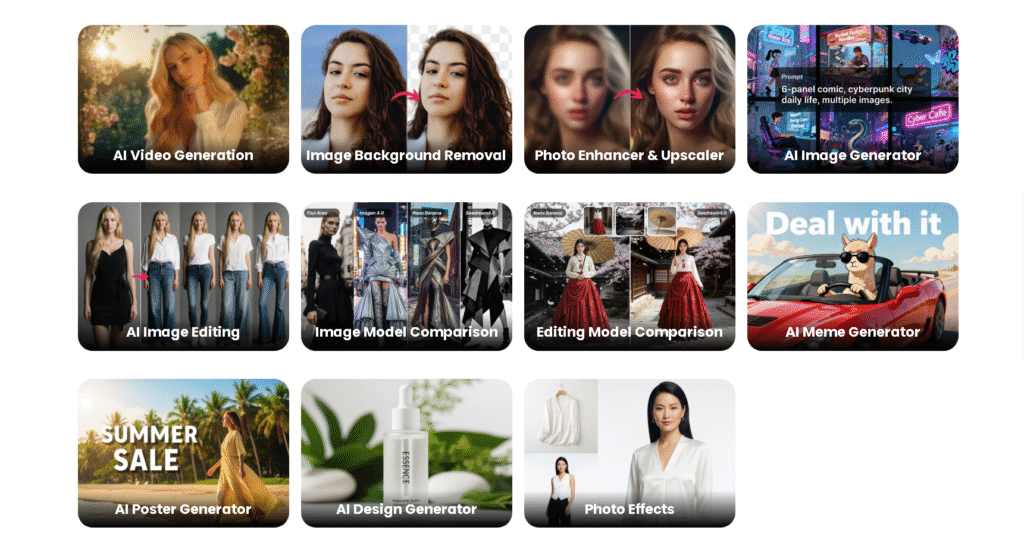
Overview
Cutout.Pro is a professional AI photo editing software built to automate visual tasks that normally take hours. Its main strength lies in its ability to remove background from image files accurately, even with complex subjects like hair, transparent objects, and layered backgrounds. I found it especially useful when working with inconsistent lighting and mixed-quality images, where manual correction would usually be required.
The platform is browser-based, which means there is no heavy software installation. You upload an image, select the task, and the AI image editor does the work within seconds. For bulk tasks, the batch background removal feature saves an enormous amount of time.
Key Features
- AI powered background removal tool with clean edge detection
- Batch background removal for bulk image editing
- Image enhancement including upscaling and noise reduction
- Portrait cutout and face refinement
- Background removal API for developers and businesses
Best For
E-commerce sellers, content creators, digital marketers, freelancers, and small teams that need fast and scalable AI photo editing without deep technical skills.
Pros & Cons
| Pros | Cons |
|---|---|
| Extremely fast background removal | Credit-based pricing can add up |
| Handles hair and fine edges well | Limited manual fine-tuning |
| Supports batch image processing | Internet dependent |
| Free background remover available | Not a full design editor |
Cutout.Pro Pricing & Subscription Plans (2025)
Cutout.Pro does not work like traditional monthly SaaS tools. It uses a credit-based pricing model, which means you pay for what you use. This is good for occasional users but can become expensive for heavy or daily usage.
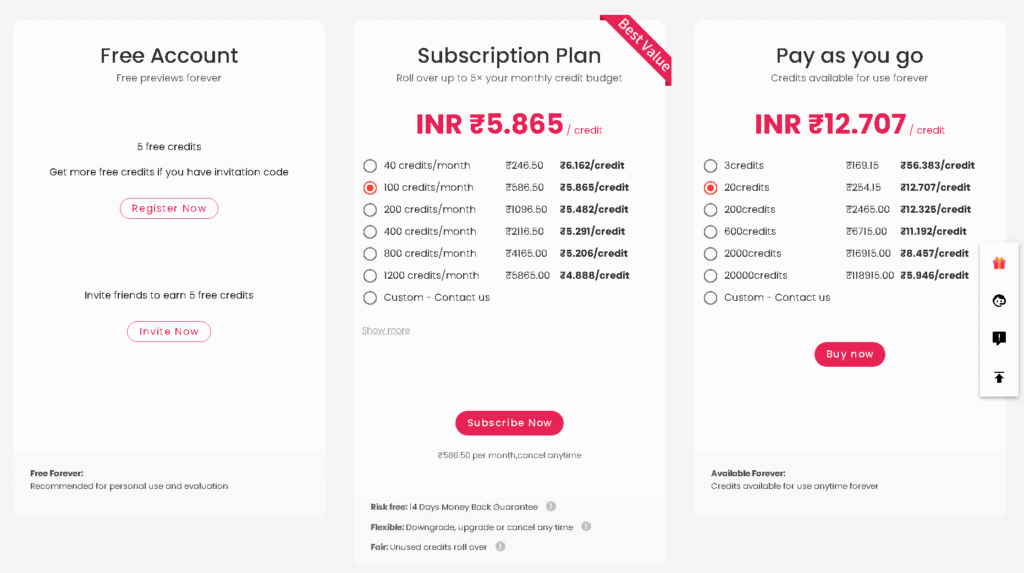
Cutout.Pro Pricing Overview Table
| Plan Type | Price | Credits Included | Best For | Notes |
|---|---|---|---|---|
| Free Plan | ₹0 | Limited free credits | Beginners, testing tool | Low resolution output, watermark may apply |
| Pay-as-you-go Credits | Starts around ₹399–₹499 | Varies by pack | Freelancers, small projects | Credits expire, no subscription lock-in |
| Monthly Subscription | Starts around ₹1,999/month | Monthly credit refill | Content creators, marketers | Better value for regular users |
| Business / API Plan | Custom pricing | High-volume credits | E-commerce, SaaS, developers | API access and bulk processing |
(Prices may vary slightly based on region and offers.)
Credit Usage Breakdown (Important to Understand)
Cutout AI photo editing pricing depends on how many credits an action consumes, not just uploads.
| Feature | Average Credit Cost |
|---|---|
| Remove background from image (standard) | 1 credit |
| High-resolution background removal | 2–3 credits |
| Batch background removal | Credits × number of images |
| Image enhancement / upscaling | 1–2 credits |
| Portrait cutout | 1–2 credits |
| API background removal | Based on volume |
This means if you process 100 product images, you are spending 100+ credits, not a flat fee.
Free Plan
| Feature | Available |
|---|---|
| AI background remover | Yes |
| Image background remover quality | Medium |
| Batch processing | No |
| High-resolution downloads | No |
| Commercial usage | Limited |
Reality check:
The free plan is good only to test how accurate the AI image editor is. It is not suitable for real client work or store listings.
Pay-as-you-go Credit Packs
| Credit Pack | Approx Price | Best Use Case |
|---|---|---|
| Small Pack | ₹399–₹499 | One-time project |
| Medium Pack | ₹999–₹1,499 | Freelancers |
| Large Pack | ₹2,999+ | Agencies, bulk editing |
My honest take:
If you edit images occasionally, this is better than subscribing monthly. But credits expire, so do not overbuy.
Monthly Subscription Plans
| Plan | Approx Price | Credits / Month | Best For |
|---|---|---|---|
| Starter | ₹1,999 | Limited monthly credits | Solo creators |
| Pro | ₹3,999+ | Higher credit limit | Marketers, agencies |
| Advanced | Custom | Very high usage | Large teams |
Important:
Once you cross daily or weekly usage, subscription plans are cheaper than buying credits repeatedly.
Business & API Pricing
| Feature | Availability |
|---|---|
| Background removal API | Yes |
| Bulk image processing | Yes |
| Custom credit pricing | Yes |
| SLA & support | Yes |
Best for:
- E-commerce platforms
- SaaS products
- Marketplaces
- Automation workflows
If you need thousands of images per month, API plans are the only sensible option.
Which Cutout.Pro Plan Should You Choose?
| User Type | Recommended Plan |
|---|---|
| Beginner / Student | Free Plan |
| Freelancer | Pay-as-you-go |
| Content Creator | Monthly Subscription |
| E-commerce Store | Pro or API Plan |
| Agency | Business / API Plan |
Honest Pricing Verdict
Cutout AI photo editing is not cheap, but it is fairly priced for what it automates.
If you compare the time saved versus manual editing or hiring designers, the cost makes sense.
However, if you only need 1–2 images occasionally, do not subscribe. Use free credits or small packs only.
Use Cases of Cutout AI Photo Editing
E-commerce Product Photography
Cutout AI photo editing works exceptionally well as a background remover for product photos. Clean white backgrounds, consistent shadows, and batch processing make it ideal for online stores managing hundreds of SKUs.
Social Media & Content Creation
For creators, removing backgrounds for thumbnails, reels, or posts becomes effortless. You can quickly isolate subjects and reuse them across multiple designs.
Marketing & Ads
Marketers benefit from fast visual turnaround. Instead of waiting on designers, teams can generate usable creatives instantly using the AI image editor.
Developers & SaaS Platforms
The background removal API allows developers to integrate image processing directly into their platforms, which is a serious advantage for scalable products.
How to Choose the Right AI Image Editor for Your Needs
If your primary requirement is to remove background from image files quickly and at scale, Cutout AI photo editing is a practical choice. However, if you need full creative control, layers, typography, and advanced retouching, you will still need a design tool alongside it.
Ask yourself these questions before choosing:
- Do I need speed or creative flexibility
- Am I editing single images or batches
- Is automation more important than manual control
- Do I need API access for scaling
Cutout.Pro fits best when automation and efficiency matter more than artistic micro-control.
Resources You May Find Helpful
If you are exploring similar tools, you may also want to check:
- AI Tools for E-commerce on our site
- LLM Use Cases in Enterprises to scale operations efficiently
- Check out more at tooljunction, we share honest AI tool reviews and tutorials to help you choose the right tools for your creative projects.
These guides cover complementary platforms that work well alongside Cutout AI photo editing.
FAQs
1. Is Cutout.Pro a free background remover?
Yes, Cutout.Pro offers a free background remover with limited usage. For professional or bulk use, you will need paid credits, which unlock higher resolution outputs and batch background removal features.
2. How accurate is Cutout AI photo editing?
From real usage, accuracy is very high for people, products, and common objects. Complex transparent objects may require minor adjustments, but results are still better than most automated tools.
3. Can I use Cutout.Pro for commercial projects?
Yes, images processed through paid plans can be used for commercial purposes, including ads, product listings, and marketing materials.
4. Does Cutout.Pro support batch image editing?
Yes, batch background removal is one of its strongest features. This is especially useful for e-commerce sellers and agencies handling large volumes of images.
5. Is Cutout.Pro suitable for beginners?
Absolutely. The interface is simple, and you do not need any design experience to start using the AI image editor effectively.
Conclusion
Cutout AI photo editing has positioned itself as a reliable and efficient AI image editor in 2025, especially for users who value speed, automation, and clean results. It may not replace full-scale design software, but it does not try to. Instead, it focuses on doing a few things extremely well, background removal, batch processing, and image enhancement.
If you regularly need to remove background from image files, process product photos, or automate visual workflows, Cutout.Pro is worth trying. Start with the free background remover, test it on real use cases, and scale only if it genuinely saves you time. That is where this tool truly proves its value.
ToolJunction simplifies AI adoption for businesses and creators. We provide trusted reviews and practical tutorials to help you select and apply the right tools for growth and productivity.
![ToolJunction.io branding used on the [Best Cutout AI Photo Editing & Background Remover Tool 2025] complete guide and tools comparison.](https://blog.tooljunction.io/wp-content/uploads/2025/09/tooljunction-1-1.webp)


