

If you have ever searched for Zapier pricing, chances are you felt confused pretty quickly. Zapier looks simple at first- connect apps, automate tasks, save time. But once you start using it for real workflows or client projects, the pricing structure feels more complex than expected.
In 2026, automation is no longer optional for businesses, freelancers, or teams. Zapier clearly works, but the real concern is Zapier pricing: How much does Zapier actually cost in 2026? And more importantly, does the cost match the value for your specific use case?
This guide explains Zapier pricing in a clear, practical way. You will understand Zapier’s pricing plans, task-based billing, hidden costs people overlook, and which plan fits solo users, small teams, or growing businesses best.
Comparing options? See the best Zapier alternatives, the Zapier listing on ToolJunction, or browse AI workflow automation tools.
Table of Contents
What is Zapier and how its pricing model works?
Zapier is a no-code automation platform that connects over 6,000 apps. You create workflows called Zaps, where a trigger in one app causes an action in another app. For example, a new lead in a form automatically goes into your CRM, sends a Slack alert, and updates a Google Sheet.
Where most people get confused is Zapier’s task-based pricing model. Zapier does not charge based on the number of Zaps alone. It charges based on tasks, which are individual actions completed inside your workflows. One Zap can consume multiple tasks every time it runs.
From my experience, this is where costs can quietly increase if you are not tracking usage properly.
Automation tools are everywhere now. Businesses are comparing costs aggressively, especially startups and small teams. Zapier pricing matters because it is not cheap for high-volume automation, and many users only realize this after hitting task limits.
In 2026, businesses care about ROI. If your automation saves hours every week, Zapier pricing can make sense. But if you are automating low-impact tasks or experimenting casually, the cost may feel high very quickly. Understanding Zapier pricing upfront helps you avoid paying for the wrong plan.
Zapier pricing plans explained (2026)
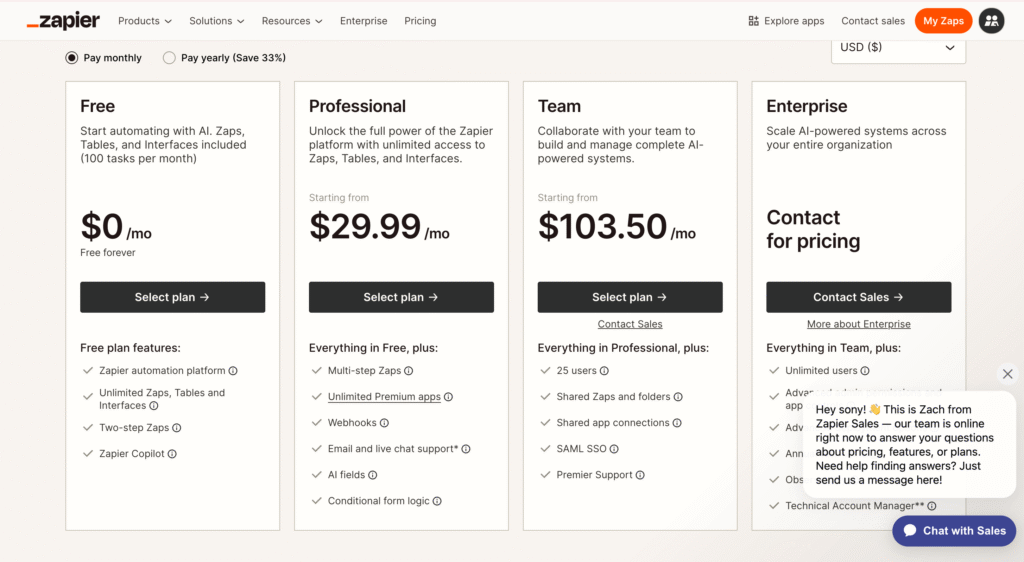
Below is a simplified comparison to help you understand Zapier pricing plans clearly.
| Plan | Monthly Price (approx.) | Task Limit | Best For | Key Feature |
|---|---|---|---|---|
| Free | $0 | 100 tasks | Testing automation | Basic single-step Zaps |
| Professional | ~$29/month | 2,000 tasks | Solo users, freelancers | Multi-step Zaps |
| Team | ~$103/month | 50,000 tasks | Small teams | Shared workspaces |
| Enterprise | Custom | Custom | Large companies | Advanced security |
Now let’s break each plan down honestly.
Zapier Free Plan
Overview:
The free plan is where most people start, and it is genuinely useful for learning how Zapier works. You get access to core features but with very strict limits. In real usage, 100 tasks disappear faster than you expect.
Key Features:
- 100 tasks per month
- Single-step Zaps only
- Basic automation triggers
- Access to most apps
Best for:
Testing Zapier, students, or very small experiments.
Pros & Cons:
| Pros | Cons |
|---|---|
| Free to use | Extremely low task limit |
| Easy setup | No multi-step workflows |
| Good for learning | Not usable for real workflows |
My honest take:
This plan is not for real work. I recommend it only to understand Zapier’s interface and logic. If you are automating even one serious workflow, you will outgrow it in days.
Zapier Professional Plan
Overview:
This is the plan most freelancers and solo founders end up choosing. You unlock multi-step Zaps, which is where Zapier becomes powerful. However, task usage must be watched carefully.
Key Features:
- Around 2,000 tasks per month
- Multi-step Zaps
- Filters and conditional logic
- Premium app integrations
Best for:
Freelancers, solopreneurs, consultants, content creators.
Pros & Cons:
| Pros | Cons |
|---|---|
| Multi-step workflows | Task limit still restrictive |
| Powerful automation logic | Costs increase with usage |
| Premium app access | Can feel expensive for solo users |
My recommendation:
For a small team of one or two people, this plan works only if your workflows are lean. If each Zap runs multiple times daily with several actions, you will hit the limit faster than expected.
Zapier Team Plan
Overview:
This plan is designed for collaboration. It gives a huge jump in task limits and adds shared folders, which is essential when multiple people manage automations.
Key Features:
- Around 50,000 tasks per month
- Team workspaces
- Shared Zaps
- Priority support
Best for:
Small teams, agencies, growing startups.
Pros & Cons:
| Pros | Cons |
|---|---|
| High task allowance | Big price jump |
| Collaboration features | Overkill for solo users |
| Scales better | Still task-based billing |
My experience:
If you are managing automations for clients or running internal processes across departments, this is the first plan that feels comfortable. For small teams, this is the sweet spot.
Zapier Enterprise Plan
Overview:
Enterprise pricing is custom and depends on usage, security needs, and support requirements. This is not for casual users.
Key Features:
- Custom task limits
- Advanced security and compliance
- Dedicated account manager
- Custom onboarding
Best for:
Large companies with complex automation needs.
Pros & Cons:
| Pros | Cons |
|---|---|
| Fully customizable | Expensive |
| Enterprise-grade security | Not transparent pricing |
| Scales massively | Not needed for most users |
Reality check:
If you need this plan, you already know why. For everyone else, it is unnecessary.
How much does Zapier cost per month in real usage?
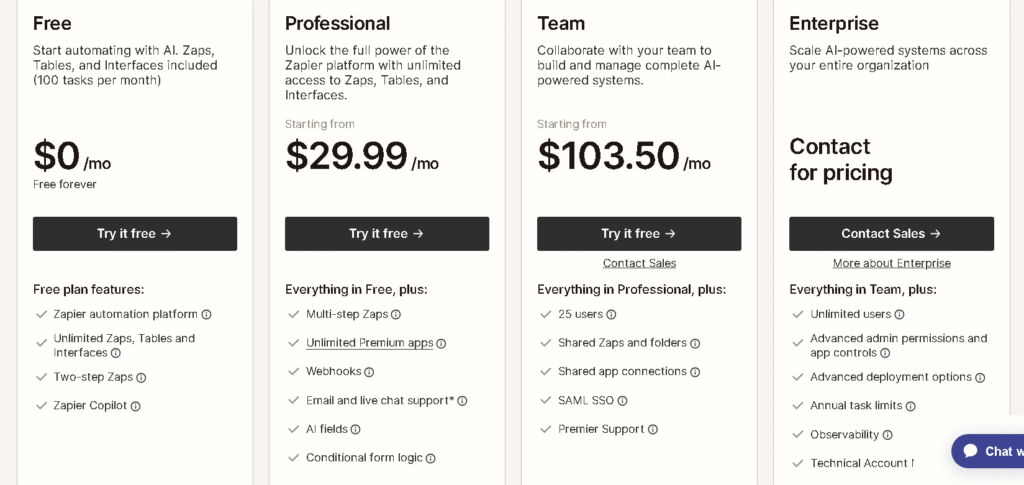
The honest answer is, Zapier costs more than it looks on paper. A simple multi-step Zap running 50 times a day can consume thousands of tasks monthly.
From my experience, people underestimate task usage. That is why Zapier feels expensive to many users. It is not overpriced, but it is easy to misuse, which increases costs.
Hidden costs in Zapier pricing most people ignore
Zapier does not hide pricing, but it does hide complexity.
- Each action counts as a task
- Retries consume tasks
- Errors can consume tasks
- High-frequency triggers add up quickly
If you are not monitoring task usage weekly, costs can spiral.
How to reduce Zapier costs without breaking workflows
- Combine actions where possible
- Avoid unnecessary triggers
- Use filters to stop Zaps from running unnecessarily
- Archive unused Zaps
- Monitor task usage weekly
This alone can save you from upgrading plans prematurely.
Is Zapier pricing worth it?
Zapier pricing is worth it only if automation replaces real manual work. If a Zap saves you hours every week, the cost is justified. If you are automating small, low-impact tasks, it will feel expensive. For small teams, I usually recommend starting with Professional, tracking usage for one month, and upgrading only if needed. Jumping straight to Team without usage data is a mistake.
Check out more at tooljunction, we share honest AI tool reviews and tutorials to help you choose the right tools for your creative projects.
FAQs
1. How much does Zapier cost per month?
Zapier ranges from free to custom enterprise pricing. Most users pay between $29 and $103 per month depending on task usage and team size.
2. Is Zapier expensive compared to other automation tools?
Zapier is more expensive for high-volume automation, but it offers unmatched app support and reliability.
3. What is Zapier’s task-based pricing model?
You are billed based on actions completed, not just workflows. Each action counts as one task.
4. Can I use Zapier for free long-term?
Only for very light usage. The free plan is not suitable for real automation needs.
5. Is Zapier pricing worth it for small teams?
Yes, if workflows replace manual work. Otherwise, costs can outweigh benefits.
Conclusion
Zapier pricing in 2026 is fair but unforgiving if you do not understand how tasks work. The platform is powerful, reliable, and easy to use, but it rewards intentional automation, not careless setup.
If you are a solo user or small team, start small, track usage, and upgrade only when automation clearly saves time or money. Zapier is not cheap, but when used correctly, it pays for itself.
If you want more guides like this on automation tools, pricing breakdowns, and honest comparisons, explore our other workflow and automation resources.
ToolJunction simplifies AI adoption for businesses and creators. We provide trusted reviews and practical tutorials to help you select and apply the right tools for growth and productivity.
![ToolJunction.io branding used on the [Zapier pricing: How much does Zapier actually cost in 2025?] complete guide and tools comparison.](https://blog.tooljunction.io/wp-content/uploads/2025/09/tooljunction-1-1.webp)


