

PPT remains a core tool for team communication, pitching ideas, and winning investment. The quality of your slides often decides if your message lands and if your project succeeds.
But even in 2025, most teams are hitting the same wall: making great slides takes too much time, and good design feels out of reach. That’s why AI PPT generator is now essential, reshaping how PPT are built. WorkPPT is one of the leading tools in this shift, turning traditional slide creation into a smart, AI-driven workflow.
Why Teams Need to Embrace AI PPT Tools Now
It’s 2025. Relying on fully manual PPT creation no longer makes sense. Traditional slide-making simply can’t keep pace with the speed and quality modern teams need.
- Endless formatting wastes time: Tweaking layouts, aligning elements, fixing fonts — hours gone on work that adds almost no value.
- Messy content, messy logic: Without a clear structure, slides turn into cluttered information dumps that confuse audiences instead of helping them decide.
- Inconsistent quality: Everyone on the team presents differently, and the mixed quality hurts your brand’s professionalism.
- Hard to adapt for different clients: Creating multiple versions for different scenarios takes too much time and energy.
That's where an AI PPT generator shines. Tools like WorkPPT cut out the repetitive, low-value tasks so your team can finally focus on what actually matters: sharpening ideas and refining strategy.
What Is WorkPPT? A Quick Overview
WorkPPT is an AI PPT creator designed to create professional presentations with a single click. It provides teams with a fast, professional, all-in-one slide service. Its users rang from business teams and marketers to educators and content creators, basically anyone who needs high-quality slides without the time sink.
WorkPPT goes beyond simply turning text or documents into slides. It intergrates AI chat, AI Mind Mapping, and AI PDF tools. By combining these functions, teams eliminate the need to switch between different platforms for data and document tasks. It cuts down the back-and-forth and saves a lot of time.
How WorkPPT Make Teamwork Smarter: Its Key Features
WorkPPT brings a smarter way of working to teams by using a set of AI tools that genuinely improve the workflow and make everyday tasks faster and easier.
1. Document to Slides: Turn Any File into a Ready PPT
As one of WorkPPT’s core features, you can upload Word files, PDF reports, long text, or even images. The AI reads your content, pulls out the key points, understands the structure, and automatically turns everything into clear, well-organized slides.
2. AI Structuring: From Loose Notes to a Clear Story
Even if all you have are scattered notes or a rough draft, WorkPPT builds a clean, logical storyline. It also builds your table of contents and section pages automatically, making your presentation more organized and professional.
3. Auto-Design Layouts: Smart, Clean, Consistent
WorkPPT keeps your slides consistent and professional. It automatically picks the best layout for each page based on your text and charts, so you don’t have to. No more messy fonts, awkward spacing, or clashing colors.
4. AI Writing Assistant for Slide Content
WorkPPT comes with a built-in AI writing assistant that helps you refine your slide content through simple, natural conversations. It’s great at turning ideas into clear bullet points and can generate summary or conclusion slides with one click. You can also ask it to summarize the current section or the entire deck instantly.
5. Professional Template Library
WorkPPT offers 5,000+ PPT templates across dozens of categories like business, marketing, education, training, and sales. Teams can quickly find a style that fits and apply it, keeping presentations visually consistent.
6. Chart & Data Visualization
WorkPPT can automatically pick up the data in your documents and turn it into clear, attractive charts. It can even summarize key insights, making data analysis effortless.
7. One-Click Regeneration & Iteration
Teams can instantly switch templates with one click, quickly changing the look of the entire presentation to suit different audiences. They can also reorganize the slides’ flow without touching the text.
8. Collaboration-Friendly Workflow
Supports real-time cloud sharing, collaborative work, and version control, so your team stays in sync and projects get done faster.
9. Multiple Export Formats
Supports exporting as PPTX, PDF, or images, so your team can share and present content anywhere.
Real-World Use Cases: How Teams Apply WorkPPT
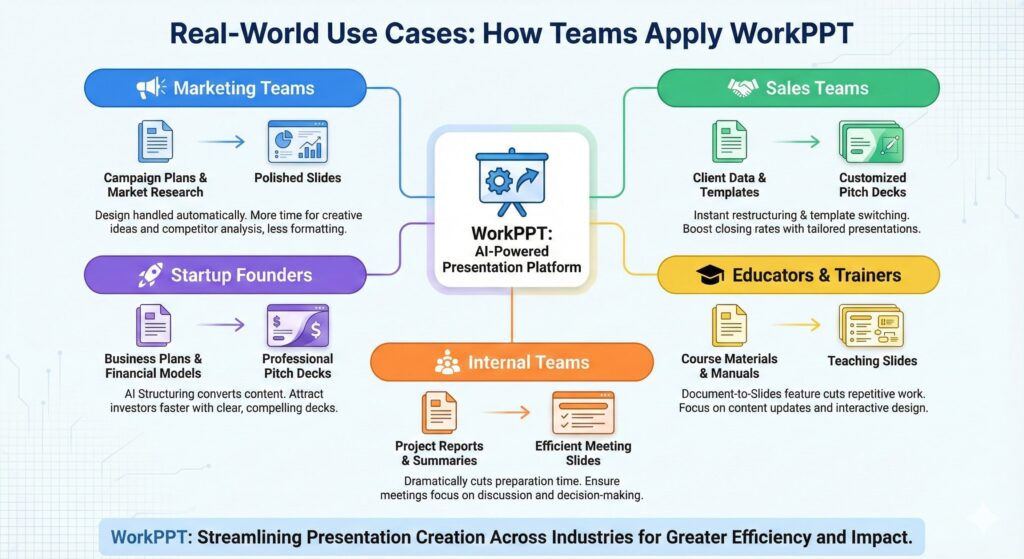
WorkPPT brings real value to teams across industries. Here’s how it helps:
- Marketing Teams: Quickly turn campaign plans and market research into polished slides. With design handled automatically, they can spend more time on creative ideas and competitor analysis instead of formatting.
- Sales Teams: Use the AI's instant restructuring and template switching to create customized pitch decks for every client, significantly boosting closing rates.
- Startup Founders: Convert business plans and financial models into clear, professional pitch decks using AI Structuring, helping attract investors faster.
- Educators & Trainers: Transform course materials and manuals into teaching slides with the Document-to-Slides feature, cutting repetitive work and focusing on content updates and interactive design.
- Internal Teams: For project reports, summaries, and internal communication, WorkPPT dramatically cuts preparation time, ensuring meetings focus on discussion and decision-making.
Best Practices to Get the Most Out of WorkPPT
To get the most out of WorkPPT AI PPT maker, combine its power with human judgment by following these best practices:
- Give AI clear input: Make sure your documents or notes are well-structured. High-quality “raw material” helps AI understand your ideas and produce better slides.
- Organize your content first: Before generating the PPT, outline your main points or structure. The clearer your draft’s logic, the more coherent WorkPPT’s output will be.
- Use templates for visual consistency: Pick or set up a professional template so that everyone on the team produces slides that look polished and on-brand.
- Let AI help tighten copy: Don’t paste long paragraphs directly. Use the AI Writing Assistant to condense text into concise bullet points that fit the “visual + text” style of slides.
- Focus on content, not design: WorkPPT handles speed and basic design, so your team can spend more time refining content, examples, and key insights.
- Collaborate and iterate: Use WorkPPT’s cloud collaboration to let multiple team members work on different sections at the same time, speeding up delivery.
Conclusion
There is no doubt: AI PPT creation is essential for boosting modern team efficiency. WorkPPT, as a next-generation AI PPT generator, offers teams and businesses a truly fast and professional solution.
It’s time to eliminate time-consuming formatting forever. Let WorkPPT handle the heavy lifting so your team can focus on creating real business value.


